


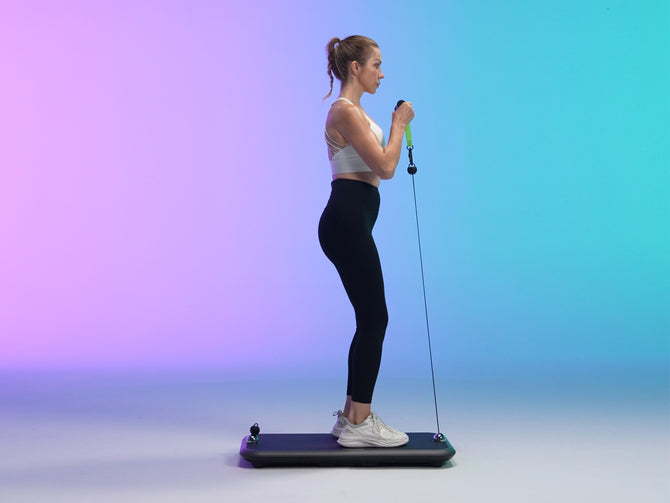


Designing your home gym requires thoughtful planning. Choose equipment that fits your training goals, leave enough room to move freely, and make the space easy to use every day. A successful layout is not necessarily the largest or most expensive one: it is one that makes your regular workouts practical.
Whether you are converting a spare room or creating a workout corner in a shared living area, these home gym design and layout tips will help you organize the space. We will also explore how the INNODIGYM smart home gym collection can fit into a digital gym setup.
1. Plan Your Home Gym Around Your Workouts
Before buying equipment, list the exercises you want to do regularly. A strength-focused routine needs space for your body, attachments, and the full movement of each exercise. A mixed routine may also need a clear area for mobility work or a separate cardio station.
Sketch the room and mark doors, windows, outlets, furniture, and walking routes. Then divide your plan into three practical zones:
- Training zone: The area occupied by the equipment and your full range of movement.
- Accessory zone: A place for handles, bars, straps, and other attachments.
- Clear access route: An unobstructed path into and out of the workout area.
In a small room, these zones can be flexible rather than permanent. What matters is that you can set up without blocking an exit or moving heavy furniture before every session.
2. Choose Space-Saving Equipment That Matches Your Goals
Space-saving equipment is useful only if it supports the workouts you actually want to do. Compare resistance capacity, operating space, accessory requirements, and storage needs rather than choosing by appearance alone.
The INNODIGYM collection lists three P1 Series options with different rated resistance capacities and panel thicknesses:
- P1 Lite: Listed with 132 lbs of rated resistance capacity and a 2.1-inch panel thickness. Consider it when a thinner panel is a priority, while checking that its resistance range suits your routine.
- P1 Plus: Listed with 198 lbs of rated resistance capacity and a 2.3-inch panel thickness. It is an option to compare if you want more resistance capacity than the Lite with a relatively slim panel.
- P1 Max: Listed with 331 lbs of rated resistance capacity and a 4.3-inch panel thickness. Consider it if greater resistance capacity is important to your planned training.
These panel measurements are not the full workout footprint. Before ordering, review each model's complete dimensions, included accessories, and operating instructions in the INNODIGYM smart home gym collection. Allow additional room for your stance, cable movement, and any bench or bar you plan to use.
3. Leave Enough Room to Move Freely
Do not judge a layout only by whether the equipment fits between two pieces of furniture. Check the space needed for the beginning, middle, and end of every planned movement.
- Check overhead clearance for exercises that raise your hands or attachments above your head.
- Allow room to step back, change position, and pick up accessories without catching cables or hitting furniture.
- Keep the workout area separate from opening doors and frequently used walkways.
- If you use a bench, plan space for both the bench and getting on and off it.
There is no single room size that works for every home gym. Use the equipment manufacturer's required clearances as your starting point, then check the movements in your own routine.
4. Understand Floor Placement and Wall-Mounting Requirements
Wall-mounted training should be planned around the specific equipment, not assumed to be an option for every digital gym. The INNODIGYM collection states that only the P1 Lite in the P1 Series supports wall-mounted training, with installation limited to solid walls such as concrete.
Do not assume that the P1 Plus or P1 Max supports the same installation. For any setup, follow the model's current placement and installation instructions, confirm the suitability of the surface, and arrange qualified installation where required. Avoid improvising mounts or using furniture as an anchor.
For floor placement, choose a stable, level area that meets the manufacturer's guidance. If you add protective flooring, check that it is suitable for the equipment and does not compromise stability.
5. Use Mirrors, Lighting, and Ventilation Thoughtfully
Mirrors can help a small home gym feel more open and provide a visual reference during some exercises. Position them where you can glance at your movement without twisting your neck or changing your posture. They are not a substitute for qualified technique guidance.
Use even lighting so you can see your equipment, controls, and the surrounding floor. Avoid placing a bright light directly behind a screen or mirror where glare makes it difficult to see. Keep windows, fans, or ventilation outlets unobstructed, and follow any equipment ventilation requirements.
6. Integrate a Digital Gym Screen or Training Device
A screen or TV can make it easier to follow virtual classes and exercise demonstrations. Place it where you can see it from your usual training positions without repeatedly turning your head. Keep power leads and charging cables outside the exercise area.
For an INNODIGYM setup, the collection lists app control and four training modes across the P1 Series: Standard, Eccentric, Chain, and Speed. Review the instructions for your model to learn how to select and use each mode before adding it to a workout.
Check device compatibility and connection requirements before deciding where your phone, tablet, or display will go. Keep controls accessible without putting the device in the path of moving attachments.
7. Organize Accessories for Easier Workouts
Accessory storage is part of home gym design, not an afterthought. Give each handle, strap, and bar a designated place close to the training area but away from your feet and cable paths.
Use suitable shelves, bins, or storage fixtures for the items you own. Confirm which accessories are included with your chosen equipment configuration before planning storage or purchasing extras. Keep equipment controls and any stopping mechanisms easy to reach, and follow the manual for changing attachments.
Home Gym Layout Ideas for Different Spaces
A shared living-room corner
Prioritize a clear training area and a simple setup routine. Choose an equipment position that does not block everyday use of the room, and store smaller accessories together. Confirm that any planned movement or storage of the machine follows its instructions.
A spare-room digital gym
Build the layout around your main strength-training station. Keep a separate clear area for warm-ups and mobility, and position your screen so it is visible from the exercises you perform most often.
A multi-use training room
If the room includes cardio equipment, a bench, and a digital resistance system, map out each station's operating area. Avoid overlapping movement paths when more than one person will use the space.
Frequently Asked Questions
Which INNODIGYM P1 model should I choose for my home gym?
Start with your resistance needs and planned exercises, then compare dimensions, installation requirements, and accessories. The collection lists the P1 Lite at 132 lbs, P1 Plus at 198 lbs, and P1 Max at 331 lbs of rated resistance capacity. More capacity is useful only if it suits your goals and the complete setup fits your space.
Can every P1 model be wall-mounted?
No. The collection specifies wall-mounted training for the P1 Lite only, on solid walls such as concrete. Check the current model instructions and installation requirements before planning a wall-mounted setup.
What is the most important small home gym layout tip?
Plan for the full workout, not just equipment storage. Measure your movement area, leave access routes clear, and make accessories easy to reach without placing them in your exercise path.
Build a Home Gym You Will Want to Use
The best home gym design combines suitable equipment, clear movement space, and an organized layout. Start with the workouts you enjoy, check the requirements of the equipment you choose, and keep the daily setup straightforward.
Ready to plan your digital gym? Compare INNODIGYM P1 Lite, P1 Plus, and P1 Max to find an option that matches your space and strength-training goals.


